carpentries-unix-exercises
Nelle’s Pipeline: A Typical Problem
Nelle Nemo, a marine biologist, has just returned from a six-month survey of the North Pacific Gyre, where she has been sampling gelatinous marine life in the Great Pacific Garbage Patch. She has 1520 samples that she’s run through an assay machine to measure the relative abundance of 300 proteins. She needs to run these 1520 files through an imaginary program called goostats she inherited. On top of this huge task, she has to write up results by the end of the month so her paper can appear in a special issue of Aquatic Goo Letters.
The bad news is that if she has to run goostats by hand using a GUI, she’ll have to select and open a file 1520 times. If goostats takes 30 seconds to run each file, the whole process will take more than 12 hours of Nelle’s attention. With the shell, Nelle can instead assign her computer this mundane task while she focuses her attention on writing her paper.
The next few lessons will explore the ways Nelle can achieve this. More specifically, they explain how she can use a command shell to run the goostats program, using loops to automate the repetitive steps of entering file names, so that her computer can work while she writes her paper.
Episode 2 Navigating Files and Directories
2.1 Exploring More ls Flags
What does the command ls do when used
with the -l option?
What about if you use both the -l and the -h option?
Solution
`-l` - long listing format, showing not only the file/directory names but also additional information such as the file size and the time of its last modification. Some of its output is about properties that we do not cover in this lesson (such as file permissions and ownership), but the rest should be useful nevertheless. `-h` + `-l` - makes file size ‘Human readable’, i.e. `5.3K` instead of `5369`.2.2 Listing in Reverse Chronological Order
By default ls lists the contents of a directory in alphabetical order by name. The command ls -t lists items by time of last change instead of alphabetically. The command ls -r lists the contents of a directory in reverse order. What happens when you combine the -t and -r flags? Hint: You may need to use the -l flag to see the last changed dates.
Solution
`-t` - most recently changed file first. `-rt` - most recently changed file last. This can be very useful for finding your most recent edits or checking to see if a new output file was written.2.3 Absolute vs Relative Paths
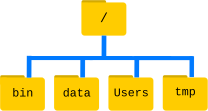
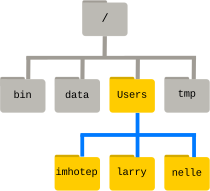
Starting from /Users/amanda/data, which of the following commands could Amanda use to navigate to her home directory, which is /Users/amanda?
cd .cd /cd /home/amandacd ../..cd ~cd homecd ~/data/..cdcd ..
Solution
1. No: `.` stands for the current directory.2. No: `/` stands for the root directory.
3. No: Amanda's home directory is `/Users/amanda`.
4. No: this goes up two levels, i.e. ends in `/Users`.
5. Yes: `~` stands for the user's home directory, in this case `/Users/amanda`.
6. No: this would navigate into a directory `home` in the current directory if it exists.
7. Yes: unnecessarily complicated, but correct.
8. Yes: shortcut to go back to the user's home directory.
9. Yes: goes up one level.
2.4 Relative Path Resolution
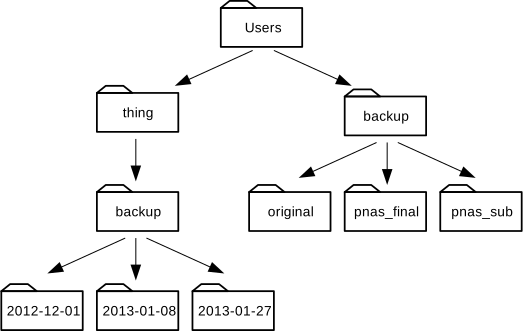
If pwd displays /Users/thing,
what will ls -F ../backup display?
../backup: No such file or directory2012-12-01 2013-01-08 2013-01-272012-12-01/ 2013-01-08/ 2013-01-27/original/ pnas_final/ pnas_sub/
Solution
1. No: there *is* a directory `backup` in `/Users`.2. No: this is the content of `Users/thing/backup`, but with `..` we asked for one level further up.
3. No: see previous explanation.
4. Yes: `../backup/` refers to `/Users/backup/`.
2.5 ls Reading Comprehension
If pwd displays /Users/backup,
and -r tells ls to display things in reverse order,
what command(s) will result in the following output:
pnas_sub/ pnas_final/ original/
-
ls pwd -
ls -r -F -
ls -r -F /Users/backup
Solution
1. No: `pwd` is not the name of a directory.2. Yes: `ls` without directory argument lists files and directories in the current directory.
3. Yes: uses the absolute path explicitly.
Episode 3 Working with Files and Directories
3.2 Moving Files to a new folder
Jamie realizes that she put the files sucrose.dat and maltose.dat into the wrong folder.
The files should have been placed in the raw folder. She runs these commands to explore the file system.
$ ls -F
analyzed/ raw/

$ ls -F analyzed
fructose.dat glucose.dat maltose.dat sucrose.dat

$ cd analyzed
Fill in the blanks to move these files to the raw/ folder to correct her mistake
$ mv sucrose.dat maltose.dat ____/____
Solution
$ mv sucrose.dat maltose.dat ../raw3.3 Renaming Files
Suppose you created a text file called statstics.txt
After creating and saving this file you realize you misspelled the filename! You want to correct the mistake, which of the following commands could you use to do so?
cp statstics.txt statistics.txtmv statstics.txt statistics.txtmv statstics.txt .cp statstics.txt .
Solution
1. No. While this would create a file with the correct name, the incorrectly named file still exists in the directory and would need to be deleted.2. Yes
3. No, the period(.) indicates where to move the file, but does not provide a new file name; identical file names cannot be created.
4. No, the period(.) indicates where to copy the file, but does not provide a new file name; identical file names cannot be created.
3.4 Moving and Copying
What is the output of the closing ls command in the sequence shown below?
$ pwd
/Users/jamie/data
$ ls
proteins.dat
 $ mkdir recombined
 $ mv proteins.dat recombined/
 $ cp recombined/proteins.dat ../proteins-saved.dat
 $ ls
proteins-saved.dat recombinedrecombinedproteins.dat recombinedproteins-saved.dat
Solution
2.Starting in the `/Users/jamie/data` directory
$ mkdir recombined ----> create new folder
$ mv proteins.dat recombined/ -----> move proteins.dat to the new folder
$ cp recombined/proteins.dat ../proteins-saved.dat -----> copies this file to the parent directory of our current location
Wildcards
(Examples from data-shell/molecules directory)
* matches zero or more characters.
*.pdb matches ethane.pdb, propane.pdb, and every file that ends with .pdb.
p*.pdb only matches pentane.pdb and propane.pdb
? matches exactly one character.
?ethane.pdb would match methane.pdb
*ethane.pdb matches both ethane.pdb, and methane.pdb.
???ane.pdb matches three characters followed by ane.pdb, giving cubane.pdb ethane.pdb octane.pdb.
3.7 List filenames matching a pattern
In the molecules directory which ls command(s) will
produce this output?
ethane.pdb methane.pdb
ls *t*ane.pdbls *t?ne.*ls *t??ne.pdbls ethane.*
Solution
3.3.8 Organizing Directories and Files
Jamie is working on a project and she sees that her files aren’t very well organized:
$ ls -F
analyzed/ fructose.dat raw/ sucrose.dat
The fructose.dat and sucrose.dat files contain output from her data
analysis. How could you use wildcards with the mv command to move both files to the analyzed directory at the same time?
Solution
mv *.dat analyzedEpisode 4 Pipes and Filters
Exercise 4.1 Sorting
If we run sort on a file containing the following lines:
10
2
19
22
6
the output is:
10
19
2
22
6
If we run sort -n on the same input, we get this instead:
2
6
10
19
22
Why?
Exercise 4.2
The head command prints lines from the start of a file and the tail prints lines from the end of a file instead.
If we were to run these 2 commands:
$ head -n 3 animals.txt > animals-subset.txt
$ tail -n 2 animals.txt >> animals-subset.txt
what would animals.txt contain?
- The first three lines of
animals.txt - The last two lines of
animals.txt - The first three lines and the last two lines of
animals.txt - The second and third lines of
animals.txt`
Solution
3.
##

Exercise 4.3
In our current directory, we want to find the 3 files which have the least number of lines. Which command would work?
wc -l * > sort -n > head -n 3wc -l * | sort -n | head -n 1-3wc -l * | head -n 3 | sort -nwc -l * | sort -n | head -n 3
Solution
4. The pipe character | is used to connect the output from one command to the input of another. > is used to redirect standard output to a fileExercise 4.4
A file called animals.txt looks like this:
2012-11-05,deer
2012-11-05,rabbit
2012-11-05,raccoon
2012-11-06,rabbit
2012-11-06,deer
2012-11-06,fox
2012-11-07,rabbit
2012-11-07,bear
If we run this command, what lines will end up in final.txt?
$ cat animals.txt | head -n 5 | tail -n 3 | sort -r > final.txt
Solution
2012-11-06,rabbit2012-11-06,deer
2012-11-05,raccoon
Episode 5 Loops
The general form of a loop:
for thing in list_of_things
do
    operation_using $thing    # Indentation within the loop is not required, but aids legibility
done
5.1 Variables in Loops
This exercise refers to the data-shell/molecules directory. ls gives the following output:
cubane.pdb ethane.pdb methane.pdb octane.pdb pentane.pdb propane.pdb
What is the output of the following code?
$ for datafile in *.pdb
> do
>    ls *.pdb
> done
Now, what is the output of the following code?
$ for datafile in *.pdb
> do
>	ls $datafile
> done
Why do these two loops give different outputs?
Solution

5.2.1 Limiting Sets of Files
What would be the output of running the following loop in the data-shell/molecules directory?
$ for filename in c*
> do
>    ls $filename
> done
- No files are listed.
- All files are listed.
- Only
cubane.pdb,octane.pdbandpentane.pdbare listed. - Only
cubane.pdbis listed.
Solution
4 is the correct answer. `*` matches zero or more characters, so any file name starting with the letter c, followed by zero or more other characters will be matched.5.2.2 Limiting Sets of Files (Part 2)
How would the output differ from using this command instead?
$ for filename in *c*
> do
>    ls $filename
> done
- The same files would be listed.
- All the files are listed this time.
- No files are listed this time.
- The files cubane.pdb and octane.pdb will be listed.
- Only the file octane.pdb will be listed.
Solution
4 is the correct answer. `*` matches zero or more characters, so a file name with zero or more characters before a letter c and zero or more characters after the letter c will be matched.5.3 Saving to a File in a Loop - Part One
In the data-shell/molecules directory, what is the effect of this loop?
for alkanes in *.pdb
do
    echo $alkanes
    cat $alkanes > alkanes.pdb
done
- Prints
cubane.pdb,ethane.pdb,methane.pdb,octane.pdb,pentane.pdbandpropane.pdb, and the text frompropane.pdbwill be saved to a file calledalkanes.pdb. - Prints
cubane.pdb,ethane.pdb, andmethane.pdb, and the text from all three files would be concatenated and saved to a file calledalkanes.pdb. - Prints
cubane.pdb,ethane.pdb,methane.pdb,octane.pdb, andpentane.pdb, and the text frompropane.pdbwill be saved to a file calledalkanes.pdb. - None of the above.
Solution
1 is the correct answer. The text from each file in turn gets written to the `alkanes.pdb` file. However, the file gets overwritten on each loop interaction, so the final content of `alkanes.pdb` is the text from the `propane.pdb` file.5.4 Saving to a File in a Loop - Part Two
Also in the data-shell/molecules directory, what would be the output of the following loop?
for datafile in *.pdb
do
    cat $datafile >> all.pdb
done
- All of the text from
cubane.pdb,ethane.pdb,methane.pdb,octane.pdb, andpentane.pdbwould be concatenated and saved to a file calledall.pdb. - The text from
ethane.pdbwill be saved to a file calledall.pdb. - All of the text from
cubane.pdb,ethane.pdb,methane.pdb,octane.pdb,pentane.pdbandpropane.pdbwould be concatenated and saved to a file calledall.pdb. - All of the text from
cubane.pdb,ethane.pdb,methane.pdb,octane.pdb,pentane.pdbandpropane.pdbwould be printed to the screen and saved to a file calledall.pdb.
Solution
3 is the correct answer. `>>` appends to a file, rather than overwriting it with the redirected output from a command. Given the output from the `cat` command has been redirected, nothing is printed to the screen.
5.5 Doing a Dry Run
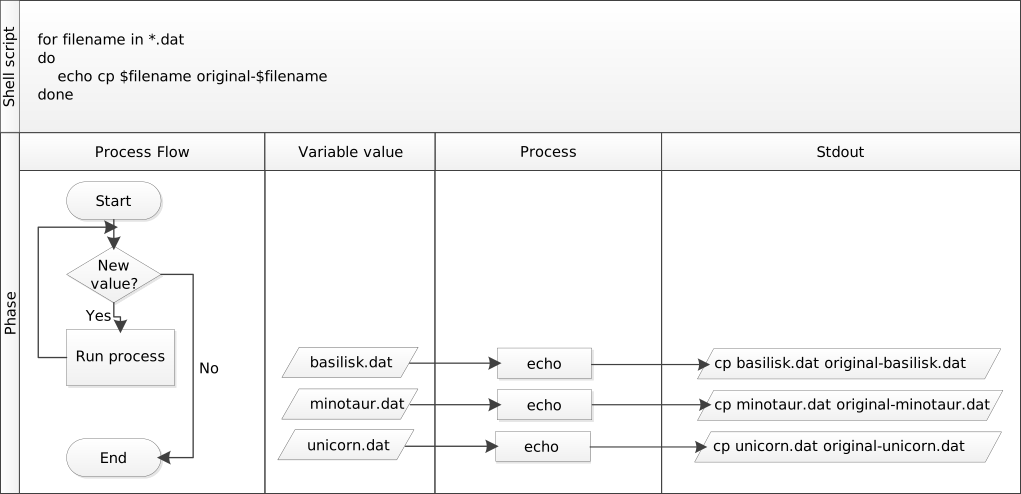
A loop is a way to do many things at once — or to make many mistakes at once if it does the wrong thing. One way to check what a loop would do is to echo the commands it would run instead of actually running them.
Suppose we want to preview the commands the following loop will execute without actually running those commands:
$ for datafile in *.pdb
> do
>   cat $datafile >> all.pdb
> done
What is the difference between the two loops below, and which one would we want to run?
# Version 1
$ for datafile in *.pdb
> do
>   echo cat $datafile >> all.pdb
> done
# Version 2
$ for datafile in *.pdb
> do
>   echo "cat $datafile >> all.pdb"
> done
Solution
The second version is the one we want to run. This prints to screen everything enclosed in the quote marks, expanding the loop variable name because we have prefixed it with a dollar sign.The first version appends the output from the command `echo cat $datafile` to the file, `all.pdb`. This file will just contain the list; `cat cubane.pdb`, `cat ethane.pdb`, `cat methane.pdb` etc.
Try both versions for yourself to see the output! Be sure to open the `all.pdb` file to view its contents.
5.6 Nested Loops
Suppose we want to set up a directory structure to organize some experiments measuring reaction rate constants with different compounds and different temperatures. What would be the result of the following code:
$ for species in cubane ethane methane
> do
>     for temperature in 25 30 37 40
>     do
>         mkdir $species-$temperature
>     done
> done
Solution
We have a nested loop, i.e. contained within another loop, so for each species in the outer loop, the inner loop (the nested loop) iterates over the list of temperatures, and creates a new directory for each combination. Try running the code for yourself to see which directories are created!Episode 6 Shell Scripts
6.1 List Unique Species
Leah has several hundred data files, each of which is formatted like this:
2013-11-05,deer,5
2013-11-05,rabbit,22
2013-11-05,raccoon,7
2013-11-06,rabbit,19
2013-11-06,deer,2
2013-11-06,fox,1
2013-11-07,rabbit,18
2013-11-07,bear,1
An example of this type of file is given in data-shell/data/animal-counts/animals.txt.
We can use the command cut -d , -f 2 animals.txt | sort | uniq to produce the unique species in animals.txt. In order to avoid having to type out this series of commands every time, a scientist may choose to write a shell script instead.
Write a shell script called species.sh that takes any number of filenames as command-line arguments, and uses a variation of the above command to print a list of the unique species appearing in each of those files separately.
Solution

6.2 Why Record Commands in the History Before Running Them?
$ history | tail -n 5 > recent.sh
If you run the above command the last command in the file is the history command itself, i.e., the shell has added history to the command log before actually running it. In fact, the shell always adds commands to the log before running them. Why do you think it does this?
Solution
If a command causes something to crash or hang, it might be useful to know what that command was, in order to investigate the problem. Were the command only be recorded after running it, we would not have a record of the last command run in the event of a crash6.3 Variables in Shell Scripts
In the molecules directory, imagine you have a shell script called script.sh containing the following commands:
head -n $2 $1
tail -n $3 $1
While you are in the molecules directory, you type the following command:
bash script.sh '*.pdb' 1 1
Which of the following outputs would you expect to see?
- All of the lines between the first and the last lines of each file ending in
.pdbin the molecules directory - The first and the last line of each file ending in
.pdbin themoleculesdirectory - The first and the last line of each file in the
moleculesdirectory - An error because of the quotes around
*.pdb
Solution
The correct answer is 2.The special variables $1, $2 and $3 represent the command line arguments given to the script, such that the commands run are:

The shell does not expand `'*.pdb'` because it is enclosed by quote marks. As such, the first argument to the script is `'*.pdb'` which gets expanded within the script by `head` and `tail`.
6.4 Find the Longest File With a Given Extension
Write a shell script called longest.sh that takes the name of a directory and a filename extension as its arguments, and prints out the name of the file with the most lines in that directory with that extension. When the script is run as below, it should print the name of the .pdb file in /tmp/data that has the most lines.
$ bash longest.sh /tmp/data pdb
Solution

The first part of the pipeline, `wc -l $1/*.$2 | sort -n`, counts the lines in each file and sorts them numerically (largest last). When there’s more than one file, `wc` also outputs a final summary line, giving the total number of lines across all files. We use `tail -n 2 | head -n 1` to throw away this last line.
With `wc -l $1/*.$2 | sort -n | tail -n 1` we’ll see the final summary line: we can build our pipeline up in pieces to be sure we understand the output.
6.5 Script Reading Comprehension
For this question, consider the data-shell/molecules directory once again. This contains a number of .pdb files in addition to any other files you may have created. Explain what each of the following three scripts would do when run as bash script1.sh *.pdb, bash script2.sh *.pdb, and bash script3.sh *.pdb respectively.
# Script 1
echo *.*
# Script 2
for filename in $1 $2 $3
do
    cat $filename
done
# Script 3
echo $@.pdb
Solution
In each case, the shell expands the wildcard in `*.pdb` before passing the resulting list of file names as arguments to the script.Script 1 would print out a list of all files containing a dot in their name. The arguments passed to the script are not actually used anywhere in the script.
Script 2 would print the contents of the first 3 files with a `.pdb` file extension. `$1`, `$2`, and `$3` refer to the first, second, and third argument respectively.
Script 3 would print all the arguments to the script (i.e. all the `.pdb` files), followed by `.pdb`. `$@` refers to all the arguments given to a shell script.
cubane.pdb ethane.pdb methane.pdb octane.pdb pentane.pdb propane.pdb.pdb
6.6 Debugging Scripts
Suppose you have saved the following script in a file called do-errors.sh in Nelle’s north-pacific-gyre/2012-07-03 directory:
# Calculate stats for data files.
for datafile in "$@"
do
    echo $datfile
    bash goostats $datafile stats-$datafile
done
When you run it:
$ bash do-errors.sh NENE*[AB].txt
the output is blank. To figure out why, re-run the script using the -x option:
bash -x do-errors.sh NENE*[AB].txt
What is the output showing you? Which line is responsible for the error?
Solution
The `-x` option causes `bash` to run in debug mode. This prints out each command as it is run, which will help you to locate errors. In this example, we can see that `echo` isn’t printing anything. We have made a typo in the loop variable name, and the variable `datfile` doesn’t exist, hence returning an empty string.Episode 7 Finding Things
7.1 Using grep
Which command would result in the following output:
and the presence of absence:
grep "of" haiku.txtgrep -E "of" haiku.txtgrep -w "of" haiku.txtgrep -i "of" haiku.txt
Solution
The correct answer is 3, because the `-w` option looks only for whole-word matches. The other options will also match ‘of’ when part of another word.7.2 Tracking a Species
Leah has several hundred data files saved in one directory, each of which is formatted like this:
2013-11-05,deer,5
2013-11-05,rabbit,22
2013-11-05,raccoon,7
2013-11-06,rabbit,19
2013-11-06,deer,2
She wants to write a shell script that takes a species as the first command-line argument and a directory as the second argument. The script should return one file called species.txt containing a list of dates and the number of that species seen on each date. For example using the data shown above, rabbit.txt would contain:
2013-11-05,22
2013-11-06,19
Put these commands and pipes in the right order to achieve this:
cut -d : -f 2
>
|
grep -w $1 -r $2
|
$1.txt
cut -d , -f 1,3
Hint: use man grep to look for how to grep text recursively in a directory and man cut to select more than one field in a line.
An example of such a file is provided in data-shell/data/animal-counts/animals.txt
Solution
grep -w $1 -r $2 | cut -d : -f 2 | cut -d , -f 1,3 > $1.txtYou would call the script above like this:
$ bash count-species.sh bear .
7.3 Little Women
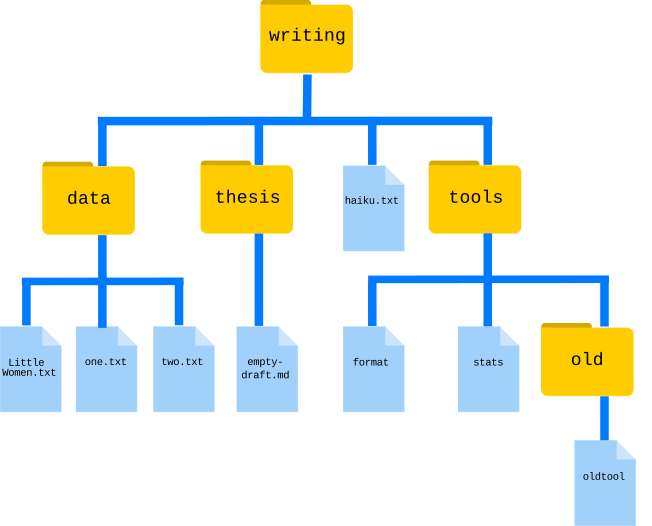
You and your friend, having just finished reading Little Women by Louisa May Alcott, are in an argument. Of the four sisters in the book, Jo, Meg, Beth, and Amy, your friend thinks that Jo was the most mentioned. You, however, are certain it was Amy. Luckily, you have a file LittleWomen.txt containing the full text of the novel (data-shell/writing/data/LittleWomen.txt). Using a for loop, how would you tabulate the number of times each of the four sisters is mentioned?
Hint: one solution might employ the commands grep and wc and a |, while another might utilize grep options. There is often more than one way to solve a programming task, so a particular solution is usually chosen based on a combination of yielding the correct result, elegance, readability, and speed.
Solution
 This solution is inferior because `grep -c` only reports the number of lines matched. The total number of matches reported by this method will be lower if there is more than one match per line.
Perceptive observers may have noticed that character names sometimes appear in all-uppercase in chapter titles (e.g. ‘MEG GOES TO VANITY FAIR’). If you wanted to count these as well, you could add the `-i` option for case-insensitivity (though in this case, it doesn’t affect the answer to which sister is mentioned most frequently).
7.4 Matching and Subtracting
The -v option to grep inverts pattern matching, so that only lines which do not match the pattern are printed. Given that, which of the following commands will find all files in /data whose names end in s.txt but whose names also do not contain the string net? (For example, animals.txt or amino-acids.txt but not planets.txt.) Once you have thought about your answer, you can test the commands in the data-shell directory.
find data -name "*s.txt" | grep -v netfind data -name *s.txt | grep -v netgrep -v "net" $(find data -name "*s.txt")- None of the above.
Solution
The correct answer is 1. Putting the match expression in quotes prevents the shell expanding it, so it gets passed to the `find` command.Option 2 is incorrect because the shell expands `*s.txt` instead of passing the wildcard expression to `find`.
Option 3 is incorrect because it searches the contents of the files for lines which do not match ‘net’, rather than searching the file names.
7.5 find Pipeline Reading Comprehension
Write a short explanatory comment for the following shell script:
wc -l $(find . -name "*.dat") | sort -n
Solution
1. Find all files with a .dat extension recursively from the current directory2. Count the number of lines each of these files contains
3. Sort the output from step 2. numerically